

AI workflow automation isn’t just about saving time – it’s about making smarter decisions and handling tasks that once required human judgment. Here’s what you need to know:
- What It Does: AI-powered workflows go beyond fixed rules. They can classify, interpret, and make decisions based on context, like prioritizing emails or routing leads.
- Why It Matters: As businesses grow, managing communication and tasks becomes overwhelming. AI can handle repetitive work, giving you more time for high-value activities.
- Key Benefits: Companies using AI save hours weekly, cut costs, and improve response times. For example, AI tools have reduced hiring times by 65% and boosted onboarding engagement by 440%.
- How to Start: Focus on repetitive, time-heavy tasks like email triaging or scheduling. Use a simple scoring system to prioritize what to automate first.
- Choosing Tools: Pick tools that integrate well with your systems, match your team’s skill level, and offer features like real-time tracking and security.
AI & expert delivery isn’t about replacing expertise – it’s about freeing you to focus on what you do best. Start small, track results, and refine your processes regularly to scale effectively.
Finding Tasks to Automate
How to Choose Tasks for Automation
When deciding what to automate, focus on tasks that are repetitive, time-consuming, and require little decision-making beyond established rules. Tasks like interpreting email tone, extracting key points from documents, or prioritizing support tickets are ideal for AI. These activities often follow consistent patterns, even if the inputs vary.
Start by evaluating coordination-heavy tasks. For instance, knowledge workers spend an average of 11 hours per week managing emails, and 27% of employees identify meetings and email responses as their biggest productivity hurdles. Activities such as data entry, manual scheduling, and triaging requests are prime automation candidates because they consume significant time and are prone to errors. A great example: In September 2025, Popl, a digital business card platform, automated over 100 workflows. By streamlining email triaging and routing demo requests via HubSpot, they filtered spam, enriched leads, and saved $20,000 annually.
To prioritize, use frameworks that amplify expert impact or a simple scoring system: evaluate each task based on time saved versus complexity to automate. Start with tasks that offer high impact but are easy to implement – this builds momentum. For businesses focused on expertise, emphasize "revenue-critical" tasks, like those influencing customer experience or sales speed. For example, McDonald’s introduced a GenAI-powered recruitment system in 2025 that cut hiring time by 65%, boosted applicant numbers by 20%, and saved recruiters 3 to 5 hours per week.
Once you’ve identified tasks, document them in an automation inventory to guide your efforts.
Creating Your Automation Inventory
Set aside 30 minutes to brainstorm recurring tasks – most teams can quickly identify 15-20 opportunities. For each task, capture its purpose, participants, inputs, steps, pain points, and success metrics. This doesn’t require formal documentation. Instead, talk to team members who handle these tasks – they’ll often notice practical details or deviations that might otherwise go unnoticed.
Next, categorize your tasks into three ROI groups: Enablement (unlocking new possibilities), Cost Savings (reducing hiring or operational expenses), and Productivity Gains (freeing up time for more strategic work). For example, a U.S. legal service provider collaborated with NIX in 2025 to automate university accreditation narratives, cutting preparation time by 90% and tripling the speed of report compilation.
To calculate ROI, use this formula:
(Time Saved × Hourly Rate × Frequency) – (Platform Costs + Setup Time).
Revisit your automation inventory every six months. AI capabilities are advancing quickly, and tasks that seemed too complex or impractical to automate could soon become feasible.
sbb-itb-f54b9a0
I built an AI Agent in 43 min to automate my workflows (Zero Coding)
Selecting AI Tools
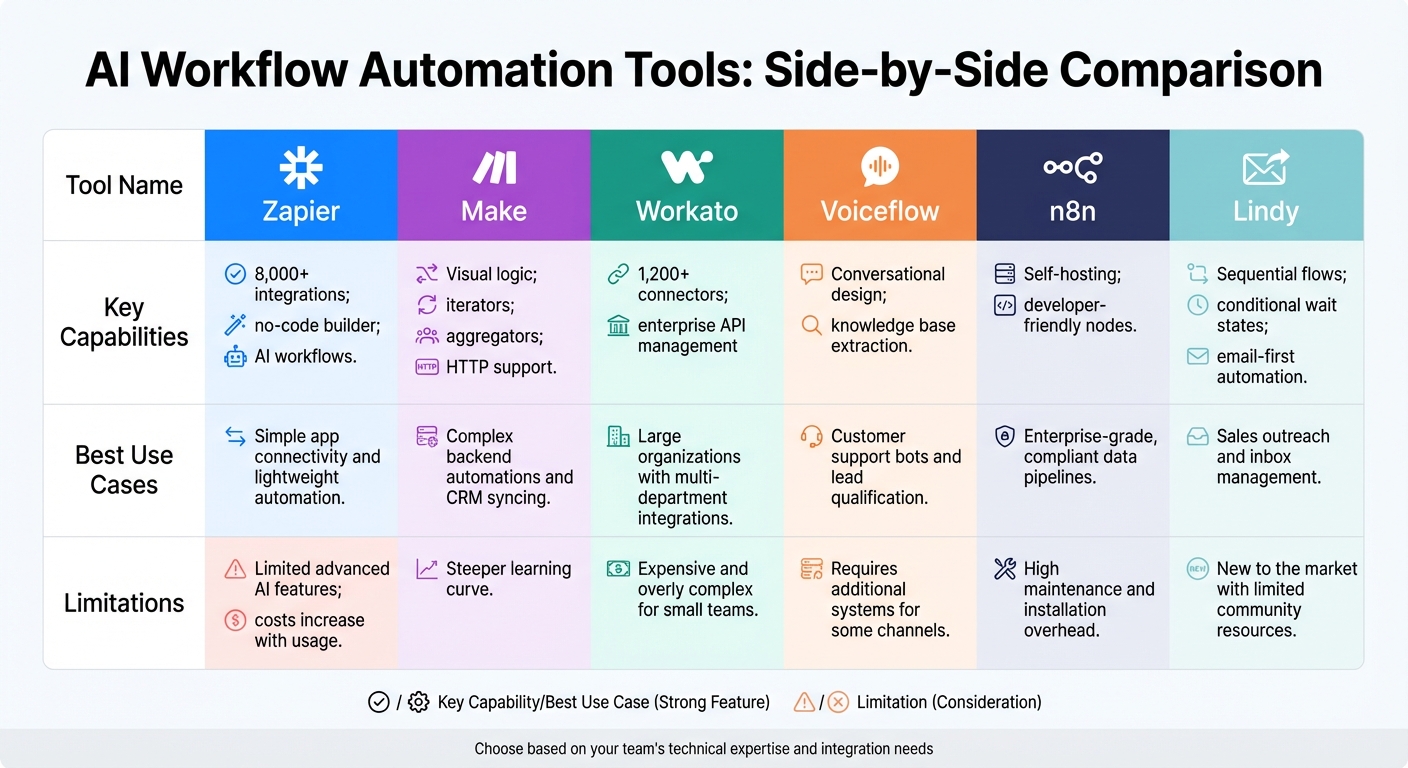
AI Workflow Automation Tools Comparison: Features, Use Cases, and Limitations
What to Look for in AI Tools
When choosing an AI tool, it’s important to find one that works smoothly with the systems you already have in place. Integration options are key – look for tools with built-in connectors for platforms like Slack, Salesforce, or HubSpot. Tools with deep API support can automate data flow and reduce errors, saving you from relying on pricey middleware solutions.
Consider your team’s technical expertise. If your team prefers simplicity, no-code platforms allow for quicker setup and less reliance on developers. In fact, teams using no-code tools often experience build cycles that are up to 90% faster, along with productivity boosts of over 60%. On the other hand, high-code platforms may be better suited for teams with dedicated engineering resources.
Another critical feature is observability – real-time logs and performance metrics are essential for identifying and fixing errors quickly. Without this, troubleshooting becomes a guessing game. Security is equally important; prioritize tools with features like Role-Based Access Control (RBAC), audit logs, and certifications like SOC 2 or GDPR compliance. For organizations with strict data requirements, flexible deployment options such as Private VPC or on-premise hosting are worth considering.
Additionally, tools with Human-in-the-Loop (HITL) capabilities can be a lifesaver for workflows that require manual intervention at certain steps. As Stephen O’Brien, Head of Product at Tines, aptly noted:
"AI is ‘the most demo-friendly software innovation there’s ever been’".
This is why it’s essential to test a tool before committing. Use free trials or community editions to evaluate how the tool performs with your actual data, rather than relying on polished demos. The right AI tool can transform your workflows, making automation smarter and more scalable.
AI Tool Comparison
The above criteria provide a solid foundation for evaluating popular AI tools, each suited to different needs. Here’s a quick breakdown of some top options:
Zapier is a go-to for simple app-to-app connections. Its no-code interface makes it easy to sync tools like your CRM and email platform. However, while it excels at lightweight automation, it lacks advanced AI-specific features and can get pricey as usage grows.
For more intricate backend workflows, Make (formerly Integromat) offers a visual builder with features like branching logic, iterators, and aggregators. It’s ideal for technical teams or agencies managing complex data processes, though it comes with a steeper learning curve. Workato, on the other hand, is designed for enterprise-level API management, making it perfect for large organizations with complex integrations. The trade-off? It’s often too expensive and complex for smaller teams.
If you’re focused on conversational AI, Voiceflow is a standout choice. It specializes in building chatbots with capabilities like knowledge base extraction and dialog analytics, making it great for customer support and lead qualification. However, it might require additional tools for channels like WhatsApp. For teams needing control over data and compliance, n8n offers self-hosting and developer-friendly features. Just keep in mind that it demands more effort for setup and maintenance.
| Tool Name | Key Capabilities | Best Use Cases | Limitations |
|---|---|---|---|
| Zapier | 8,000+ integrations, no-code builder, AI workflows | Simple app connectivity and lightweight automation | Limited advanced AI features; costs increase with usage |
| Make | Visual logic, iterators, aggregators, HTTP support | Complex backend automations and CRM syncing | Steeper learning curve |
| Workato | 1,200+ connectors, enterprise API management | Large organizations with multi-department integrations | Expensive and overly complex for small teams |
| Voiceflow | Conversational design, knowledge base extraction | Customer support bots and lead qualification | Requires additional systems for some channels |
| n8n | Self-hosting, developer-friendly nodes | Enterprise-grade, compliant data pipelines | High maintenance and installation overhead |
| Lindy | Sequential flows, conditional wait states, email-first automation | Sales outreach and inbox management | New to the market with limited community resources |
Setting Up and Scaling AI Automation
How to Implement AI Tools
When introducing AI tools, it’s smart to start small. Instead of trying to overhaul an entire process all at once, focus on what Rachel Woods, Founder of DiviUp, calls a "tiny but useful" piece of work. This approach minimizes risks and allows you to quickly see what’s working and what isn’t.
Follow the CRAFT Cycle to guide your implementation:
- Clear Picture: Document your process.
- Realistic Design: Create a minimum viable automation.
- AI-ify: Integrate and configure the tool.
- Feedback: Test and refine.
- Team Rollout: Train your team to use the system effectively.
It’s also important to assign tasks thoughtfully. Use AI for low-risk activities like research and brainstorming (Discovery tasks) while keeping human oversight for critical areas like compliance, finance, or customer communication (Trust tasks).
To scale successfully, establish a centralized data foundation. This "single source of truth" ensures all automation tools work with clean and structured data, avoiding the pitfalls of poor data quality. Nick Scavone, CEO of Seam AI, captures the potential of AI perfectly:
"AI offers arbitrage across workflows and gives internal business users technical superpowers".
Once your system is up and running, it’s essential to consistently track results and refine your workflows.
Tracking Results and Improving Workflows
AI automation isn’t a "set-it-and-forget-it" solution – it requires ongoing attention. Regular monitoring helps you spot errors, measure effectiveness, and uncover new opportunities for scaling. Set clear metrics to evaluate success, such as time saved, accuracy, ROI, and user satisfaction.
Accuracy is particularly important. Calculate it by comparing tasks completed without manual intervention to the total number of tasks. You can also track the manual intervention rate by logging error overrides per 100 tasks. These insights will highlight areas that need adjustment.
Here’s a practical example: In 2025, the IT team at Remote, a global HR platform, used AI to manage 1,100 support tickets monthly for 1,800 employees. By integrating ChatGPT with Slack and Notion, they developed a system that classified issues and suggested solutions based on historical data. As a result, 28% of tickets were resolved automatically, saving the three-person IT team over 600 hours each month.
To keep improving, schedule regular reviews. Conduct quarterly audits to clean up outdated logic, monitor token usage, and fine-tune prompts as AI models evolve. Set cost-cap alerts to prevent overspending on AI calls, and revisit failed automation attempts every six months. Advances in AI models can turn previously unworkable ideas into successes.
Measure your success by focusing on ROI through Enablement, Cost Savings, and Productivity Gains. For instance, in 2025, ActiveCampaign tackled a 25% churn rate among new users by creating an AI-driven onboarding system. This system automatically tagged signups by language and enrolled them in tailored webinar sessions. The result? A 440% increase in webinar attendance and a 15% drop in early-stage churn within just 90 days.
Best Practices for AI Automation
Keeping Human Control
AI automation delivers the best results when humans remain in charge. Current AI systems often falter with intricate, multi-step tasks, so it’s crucial to establish clear guidelines for when automation should hand over to human supervision. Simply put, you need clear protocols to determine when a task requires human involvement.
A useful approach is to differentiate between Discovery tasks and Trust tasks. Discovery tasks – like brainstorming, research, or generating ideas – carry lower risks and allow for creativity. On the other hand, Trust tasks, such as compliance checks, financial decisions, or medical guidance, demand rigorous oversight and precise processes.
For high-stakes activities, consider implementing a Human-in-the-Loop (HITL) model. In this framework, AI offers recommendations, but humans retain the final say. For example, an AI might flag an insurance claim for further review, but a trained professional makes the ultimate decision. Maintaining detailed records of both automated outputs and human interventions is key for ensuring transparency and meeting regulatory standards.
Start small with progressive delegation – automate low-risk parts of a process first. Expand AI’s responsibilities only after it consistently proves dependable. Additionally, regulations like the EU AI Act require that humans overseeing AI systems must be knowledgeable about the technology’s limitations and have the authority to intervene or override decisions when necessary.
Once human oversight is firmly in place, the next step is to prepare your team to effectively manage and optimize these AI tools.
Preparing Your Team for AI Tools
To successfully integrate AI, your team must be ready to manage and refine its outputs. Begin by identifying AI Champions within each department – individuals who can lead adoption efforts and address challenges as they arise. Resistance to change is natural, but while initial concerns should be acknowledged, persistent negativity may need to be addressed to keep progress on track. Celebrate early adopters who are already experimenting with AI tools and demonstrating their potential benefits.
A parallel running strategy can help ease the transition. Run AI systems alongside existing human workflows so your team can compare results and gain confidence before fully committing to automation. Document the outcomes of pilot programs to identify what works, and prioritize training that highlights how AI can enhance roles rather than replace them. The goal is to shift employees from executing tasks to managing AI systems – focusing on directing, reviewing, and improving AI-generated outputs.
Planning for Long-Term Growth
Once your team is equipped and automation is under control, it’s time to think about the future. AI evolves rapidly, so flexibility is essential. Follow the principle: "Own the Playbook, Rent the Tech." Instead of becoming dependent on a specific tool, invest in creating a detailed playbook with clear processes that can easily transition to newer AI models as they become available. Regular updates to your playbook will help you stay ahead of the curve.
To support long-term AI integration, consider establishing new roles. For example, a Chief AI Officer (CAIO) can oversee strategy and governance, while AI Operators can lead adoption efforts, and AI Implementers can focus on building solutions. Encourage ongoing learning through regular training sessions and demonstrations.
Keep an eye out for performance drift by monitoring metrics like manual intervention rates, accuracy, and quality trends. AI outputs can degrade over time due to changes in business conditions or shifts in data quality. Schedule quarterly audits to review and refine your systems.
"The real value comes when you automate entire processes – scaling what your team does best and unlocking ‘infinite time’ for the work only humans can do."
The ultimate goal isn’t to automate everything. Instead, it’s about freeing your team to focus on the strategic, creative, and relationship-driven tasks that only people can truly excel at.
Conclusion
AI workflow automation takes the grind out of your day-to-day tasks, letting you focus on the work that truly needs your expertise. By offloading repetitive, time-consuming activities, you gain the freedom to dive into strategic planning, creative problem-solving, and building meaningful connections – areas where human skills shine. Companies adopting AI workflows have reported impressive results: processing times cut by 60–85%, error rates reduced by 70–95%, and operational costs lowered by 40–65%.
The best way to get started? Start small. Choose one impactful task – like sorting emails, routing leads, or preparing for meetings – and automate it. Even a basic automation can save you hours each week while delivering measurable value, often adding up to hundreds of dollars in monthly savings. This single step can pave the way for more streamlined and scalable processes.
"AI workflows are basically automation with a brain. You can delegate the parts of your work that are repetitive (but still complex) to software that can actually interpret context instead of just following rigid rules."
- Nicole Replogle, Staff Writer, Zapier
Businesses that embrace AI workflow automation today position themselves to scale efficiently tomorrow. This is a core component of scaling professional services in a competitive market. Imagine handling 200–500% more work without needing to proportionally increase your team size. Take the first step this week: automate one workflow, test it out, and refine as you go. Progress beats perfection every time, and the time and energy you save will be a gift to your future self.
FAQs
How can I identify tasks that are ideal for AI automation?
To identify which tasks are ideal for AI automation, start by pinpointing repetitive, rule-based activities. Think about tasks like data entry, document routing, or handling standard email responses. These are the kinds of jobs that follow clear, repeatable steps and often consume a significant chunk of time on a daily or weekly basis.
It’s also important to focus on tasks that generate structured and reliable data, such as spreadsheets or CRM entries. AI thrives on high-quality data, so this is a key factor in ensuring success. Prioritize tasks that involve straightforward decisions rather than those requiring creativity, human judgment, or empathy.
Once you’ve identified potential tasks, evaluate the potential savings in time and money. For example, calculate the hours you could reclaim and assign a dollar value to that time (e.g., $150 per hour). This will help you determine whether the benefits of automating a task outweigh the costs of implementing AI.
A smart approach is to start small. Choose one high-volume task as a pilot project to test how well the automation works. Once you’ve measured its success, you can gradually expand to other tasks. For more in-depth strategies and frameworks, check out resources designed to help professionals and consultants integrate AI into their workflows seamlessly.
What should I consider when choosing AI tools for automating workflows?
When you’re choosing AI tools to automate your workflow, it’s important to start by evaluating your business’s size, technical know-how, and current stage of growth. For instance, a solo coach might lean toward no-code tools with simple drag-and-drop interfaces, while larger firms may require platforms that offer advanced features and custom integration options.
Pay close attention to factors like integration options, scalability, and ease of use. The right tool should work effortlessly with your existing systems, such as your CRM, calendar, and payment platforms. It should also be built to handle large workloads without slowing down and include user-friendly features like templates or low-code interfaces to speed up setup and execution.
Don’t overlook cost, security, and vendor support either. Look for a pricing structure that fits within your budget, ensure the tool has strong data protection measures, and confirm that the vendor offers dependable customer support. By carefully weighing these elements, you can select an AI solution that matches your needs and simplifies your operations.
What are the best strategies for successfully implementing and scaling AI workflow automation in my business?
To make AI workflow automation work for your business, start by pinpointing the processes you want to automate. Make sure these processes align with your overall goals. Prioritize tasks that are repetitive, follow clear rules, and can bring measurable results – like cutting costs or speeding up workflows. Start small by building modular AI solutions, test them with a pilot team, and tweak them based on feedback before rolling them out across your organization.
When scaling, focus on creating reusable tools like model APIs or low-code bots that different departments can adapt to their needs. Train your team to use these tools effectively and put governance policies in place to ensure everything runs smoothly. Keep an eye on key metrics, such as how many tasks are automated, error rates, and the financial savings in dollars. Strike a balance between automation and human expertise by figuring out where people add the most value. And don’t forget to regularly monitor and improve your AI systems to keep them performing as expected.
For more ideas and tips, check out resources that can help your team build their AI skills and fine-tune your automation strategy.
Related Blog Posts
- 7 Ways to Scale Your Consulting Business Fast
- Ultimate Guide to Scaling Professional Services
- How to Scale Expertise with AI
- How AI Helps Solve Client Journey Pain Points
 Scale Your Expertise