

Choosing the right membership site platform is critical for your business’s success. The wrong choice can lead to costly migrations and unhappy members, while the right platform supports growth and smooth operations. Here’s a step-by-step guide to help you make the best decision:
- Define Your Needs: Identify your goals, audience, business stage, and content types (e.g., courses, community, video library). Consider features like drip content, forums, and mobile apps.
- Plan for Growth: Choose a platform that matches your technical skills and can scale with your business as it grows.
- Set a Budget: Account for all costs, including platform fees, hosting, payment processing, and video hosting. For example, SaaS platforms range from $119–$400/month, while WordPress plugins like MemberPress cost $179–$500/year.
- Engagement Features: Look for tools like analytics dashboards, gamification, and mobile apps that help retain members and increase interaction.
- Test Before Committing: Use free trials to explore features, test workflows, and ensure the platform meets your needs.
Quick Comparison:
| Platform | Best For | Key Features | Mobile App | Starting Price |
|---|---|---|---|---|
| Mighty Networks | Community Growth | Member matching, livestreaming | Branded app | $41/month (annual) |
| Kajabi | All-in-One Marketing | Drip content, funnels, email tools | Native app | $71/month (annual) |
| Podia | Budget-Friendly | Forums, email marketing, bundling | No native app | $33/month (5% fee) |
| Circle | Community-First | Gated spaces, live events | Branded app | $89/month (annual) |
| Uscreen | Video Memberships | Netflix-style catalog, live chat | Branded app | $149/month + $1.99/subscriber |
| MemberPress | WordPress Users | Paywalls, LMS integration | No native app | $179.50/year (~$15/month) |
Pro Tip: Start small, test features, and prioritize platforms that align with your core goals. A well-chosen platform can boost engagement, reduce churn, and support long-term growth.
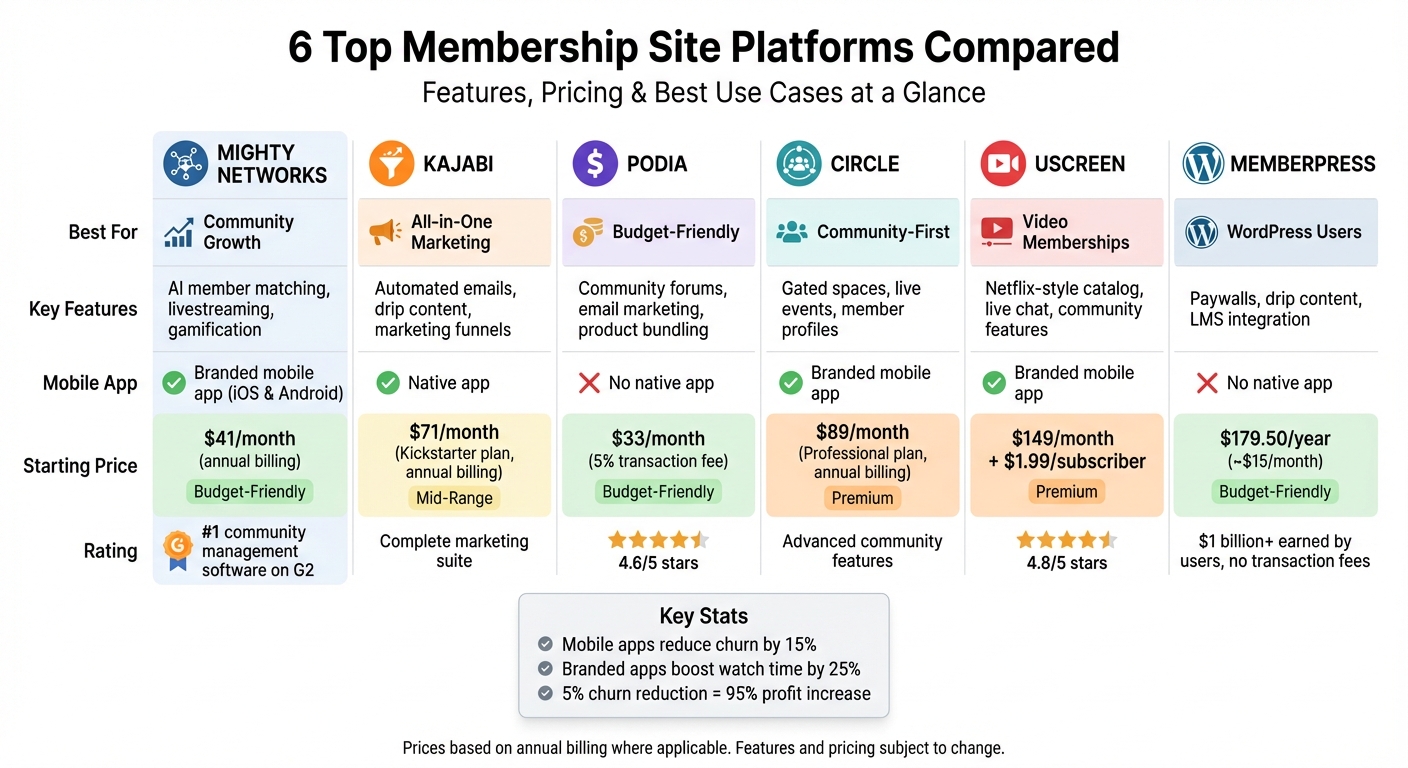
Membership Site Platform Comparison: Features, Pricing & Best Use Cases
Best Community & Membership Site Platforms in 2025 (Full Demo & Comparison)
1. Identify Your Membership Site Requirements
Before diving into platform comparisons, take a step back and define your needs. The clearer you are about your goals and requirements, the easier it will be to eliminate platforms that don’t align with your vision.
1.1 Clarify Your Business Goals and Audience
Start by pinpointing your main purpose. Are you creating an educational hub, a community network, a lead-generation tool, or a platform to establish authority in your field? Your answer will shape the features you prioritize.
Next, outline your revenue model. Will you charge monthly or annual subscriptions to create recurring income? Offer one-time fees for digital products? Or perhaps create tiered pricing plans to give members flexibility? The subscription economy is booming, growing 435% in less than a decade, so you’re stepping into a well-established model.
Define the transformation you want for your members. For instance, are you helping freelancers transition into confident business owners? This vision will influence your platform’s design and structure.
"It’s also key to consider your ideal member when choosing the types of content you will use and your content plan. Think about the types of content they are likely to want to use and also how busy they are…" – Jude Wharton, Co-founder, Ready Steady Websites
Your business stage is another important factor. A startup has different needs than a fast-growing community or an established business expanding online. The features you require will depend on where you are in your journey.
Finally, decide on your access model. Will your membership be open year-round, or will you use limited enrollment periods to create urgency? Will you drip-feed content over time to keep members engaged, or provide an all-access library for self-paced learning? Once you’ve nailed down these details, list the content types that will best deliver the experience you want to create.
1.2 Plan Your Content Types
Take stock of the content you currently offer and think ahead to what you might want to add in the future. This step can save you from technical headaches later when you’re ready to expand.
Think about how your audience consumes content. Are they watching videos during their commute, listening to podcasts at the gym, or downloading workbooks for weekend study sessions? Their habits should guide your decisions.
If video content is part of your plan, consider whether you’ll need features like searchable transcripts, mobile app access, or a Netflix-style catalog. For community-driven platforms, look for tools like forums, member profiles, and live chat. Course creators will benefit from progress tracking and quizzes to enhance the learning experience.
Don’t overlook engagement tools. Gamification features like badges and progress bars can encourage members to stay active. Platforms offering branded mobile apps can reduce monthly churn by 15% and boost watch time by 25%.
| Content Type | Best Delivery Method | Key Feature Needed |
|---|---|---|
| Online Courses | Drip-feed or Self-paced | Progress tracking, Quizzes |
| Community | Real-time / Ongoing | Forums, Member profiles, Chat |
| Video Library | On-demand (Netflix-style) | Searchable transcripts, Mobile app |
| Live Events | Scheduled | Calendar, RSVP, Live streaming |
| Digital Downloads | Immediate access | Secure file hosting, PDF support |
Once you’ve outlined your content types, it’s time to assess your technical skills and plan for growth.
1.3 Consider Growth Potential and Technical Skills
Be honest about your technical abilities. Some platforms require coding knowledge and regular maintenance, while others offer user-friendly, drag-and-drop tools. Choose an option that matches your skill level – whether that’s a DIY approach, a Done-For-Me service, or a SaaS platform.
Scalability is another crucial factor. What happens when your membership grows from 50 to 500, or even 5,000? Your platform should be able to handle increased traffic, more content, and additional features without forcing you to start over. As your business evolves, revisit your platform to ensure it keeps pace with your growth.
Decide whether you want to own the technology (via a one-time fee) or prefer a SaaS subscription where you manage your data and content without worrying about the backend. This decision impacts both your initial investment and long-term flexibility.
Finally, focus on your core offering. Whether it’s content, digital products, courses, or community-building, avoid platforms that try to be “all-in-one” but lack depth in your primary area. It’s better to excel in one area than spread yourself too thin across multiple features.
2. Calculate Your Budget and Review Pricing Structures
When building your membership site, it’s important to plan for all the costs involved. The platform fee isn’t the only expense – you’ll need to account for various elements that can add up over time.
2.1 Calculate Startup and Monthly Costs
Start by listing your main expenses: a domain (about $10–$17 per year), hosting, and a membership solution (either a plugin or an all-in-one platform).
If you’re using a self-hosted WordPress setup, expect shared hosting to cost around $3–$15 per month, plus $180–$500 annually for a membership plugin like MemberPress. While this option keeps initial software costs low, don’t forget to budget for security, maintenance, and eventual upgrades to a virtual private server (VPS), which can run $100–$180 per month as your site grows. A major perk of MemberPress? Users have collectively earned over $1 billion in revenue, all while avoiding extra transaction fees.
For a simpler, bundled approach, SaaS membership platforms combine hosting, security, and email services, typically costing between $119 and $400 per month.
"We were stitching together a ton of different platforms, and we’re not a technical team… Consolidating everything on Uscreen was night and day for us, operationally and creatively." – Chris Sharpe, Co-Founder, Find What Feels Good
Don’t forget payment processing fees. Services like Stripe and PayPal usually charge 2.9% + $0.30 per transaction, and some platforms tack on additional fees – sometimes as high as 7.5% or more.
If your site includes video content, consider professional video hosting. Hosting large files on your server can slow things down, so services like Vimeo (around $180 per year) are a worthwhile investment. You’ll also need email marketing tools, which can cost $50–$150 per month as your subscriber base expands.
| Cost Category | Estimated Expense | Notes |
|---|---|---|
| Domain Name | $10–$17 per year | Annual fee |
| Shared Hosting | $3–$15 per month | Great for beginners |
| VPS Hosting | $100–$180 per month | Ideal as your site scales |
| Membership Plugin | $179–$500 per year | E.g., MemberPress |
| All-in-One Platform | $119–$400 per month | Includes hosting, security, and support |
| Payment Processing | 2.9% + $0.30 per sale | Standard for Stripe/PayPal |
| Video Hosting | $15–$60 per month | E.g., Vimeo Pro |
| Email Marketing | $50–$150 per month | Costs grow with your subscriber count |
Keep in mind that many platforms offer introductory discounts – like 50% off for the first year – but these deals often revert to full price upon renewal. Once you’ve accounted for all your costs, the next step is to align them with your revenue strategy.
2.2 Match Pricing Models to Your Revenue Plan
After listing your expenses, make sure your pricing model will help you hit your revenue goals. The platform you choose should support your financial strategy. For instance, if you charge $10 per month for subscriptions, you’d need about 1,000 members to generate $120,000 annually. On the other hand, charging $50 per month would require only 200 members to reach the same target.
Offering tiered pricing can also be effective, especially if your audience includes different groups, such as beginners, professionals, and advanced users. By creating distinct levels, you can adjust both content access and pricing to meet their specific needs. Annual subscriptions are another option – they provide upfront cash flow and help reduce churn. Just make sure your platform supports both monthly and discounted annual billing.
If you plan to sell one-time digital products alongside recurring memberships, check that your platform can handle both types of payments seamlessly.
Aim for a profit margin of 75% to 90% before factoring in additional business expenses. For example, payment processing and platform fees might take up 5–8% of your revenue, so include these costs in your pricing calculations. To maintain healthy margins, calculate your "unit costs" (the total of these fees plus acquisition costs per member) and multiply by two or three.
Choose a membership platform that aligns with your revenue strategy and offers the features you need without forcing compromises.
sbb-itb-f54b9a0
3. Evaluate Features for Member Engagement
Once your budget is set, it’s time to focus on features that drive member engagement. These tools can be the difference between a thriving, active community and one that struggles with retention. In fact, 51% of association executives point to low engagement as the top reason members don’t renew their subscriptions. By prioritizing engagement-focused features and comparing expert frameworks, you’ll align with your goals and budget while addressing this challenge head-on.
3.1 Core Features to Look For
To build a vibrant community, community interaction tools are a must. Platforms offering discussion forums and private messaging create a sense of connection and belonging, which fosters long-term engagement. For memberships centered around education, drip content is crucial. By releasing lessons incrementally, you can prevent members from feeling overwhelmed while encouraging them to stick around for the full learning experience.
Mobile accessibility is another key factor. Platforms with branded mobile apps for iOS and Android can make a huge difference – reducing monthly churn by 15% and boosting member watch time by 25%. Members increasingly expect to access content on the go, and a native app ensures they can do so seamlessly. If your membership relies heavily on video content, look for platforms that support Netflix-style catalogs and live streaming.
Analytics dashboards are invaluable for understanding what drives engagement. With tools to track metrics like churn rates, content completion, and member lifetime value, you’ll gain insights into what’s working and what’s not. Some platforms even include engagement scoring systems, assigning points to activities like attending webinars or completing courses. These scores can help you identify at-risk members and take action before they cancel. Automated re-engagement tools, such as email triggers for inactivity, are equally helpful in keeping members connected.
For audiences that thrive on competition and recognition, gamification features like leaderboards, badges, and progress streaks can significantly boost participation. However, it’s worth noting that these features won’t appeal to every audience, so consider your members’ preferences before implementing them.
3.2 Compare Platforms Using a Feature Table
Once you’ve identified the features most important to your community, use a comparison matrix to evaluate platforms and find the best fit.
Different platforms emphasize different engagement strategies. Here’s a breakdown of how some popular options stack up:
| Platform | Best For | Engagement Features | Mobile App | Starting Price |
|---|---|---|---|---|
| Mighty Networks | Community Growth | AI member matching, livestreaming, gamification | Branded mobile app | $41/mo (annual billing) |
| Kajabi | All-in-One Marketing | Automated emails, drip content, marketing funnels | Native app | $71/mo (Kickstarter, annual) |
| Podia | Budget-Friendly | Community forums, email marketing, product bundling | No native app | $33/mo (5% transaction fee) |
| Circle | Community-First | Gated spaces, live events, member profiles | Branded mobile app | $89/mo (Professional, annual) |
| Uscreen | Video Memberships | Netflix-style catalog, live chat, community features | Branded mobile app | $149/mo + $1.99/subscriber |
| MemberPress | WordPress Users | Paywalls, drip content, LMS integration | No native app | $179.50/year (~$15/mo) |
Mighty Networks is recognized as the #1 community management software on G2, and Uscreen boasts a 4.8/5 star rating, earning praise for its video-first approach. Podia, with its 4.6/5 rating, is favored by solo creators for its affordability and ease of use. For those already using WordPress, MemberPress offers robust customization without the recurring monthly fees of all-in-one platforms.
Ultimately, the best choice depends on your members’ needs. If peer-to-peer networking is key, prioritize platforms with strong community tools. If video content is central, opt for platforms with advanced media hosting and mobile apps. Take advantage of free trials to test different platforms and find the one that feels most intuitive for your specific goals.
4. Test Your Platform and Launch
Now that you’ve chosen your platform, it’s time to test and launch a functional version that incorporates the features and content plan you’ve developed.
4.1 Take Advantage of Free Trials
Most platforms provide free trials ranging from 14 to 30 days, giving you time to explore their features before making a commitment. Use this trial period to build a basic version of your site. Include starter content, a community area, and a landing page to get a feel for how everything works together.
Pay special attention to paywall security. Test how well the platform protects restricted content by attempting to access it as a guest. Some systems using JavaScript-based protection can be bypassed by disabling JavaScript, while WordPress-based solutions often provide stronger server-side security. Don’t forget to test automated emails, like welcome messages and drip content notifications. Tools like WP Mail SMTP can help ensure these emails are delivered correctly during this phase.
Simulate typical member activities to uncover any potential issues. For example, start an introduction thread, upload different types of media, and complete a test signup. If you’re planning to block account sharing, tools like WP Activity Log can help you verify that the platform prevents multiple simultaneous logins.
"What first caught my attention about Podia was its seamless integration of courses and community, along with the flexibility to offer courses in various formats – written content, videos, and downloadable materials." – Cindy Cisneros, Coach
4.2 Set Up Content and Payment Systems
Before welcoming your first member, ensure your site is well-organized and stocked with valuable content. Structure your material around clear themes or learning paths to avoid creating an "empty site" experience, which could harm your credibility. Decide whether to use a full-access model, where all content is available immediately, or a drip-feed model, where content is released on a schedule. Having at least a month’s worth of content ready will allow you to test the drip scheduling features during your trial.
Set up secure payment systems by connecting your platform to gateways like Stripe, PayPal, or Square. Choose a pricing structure – whether it’s a one-time fee, monthly subscription, or annual payment – and align it with your content tiers. Automate workflows for sign-up confirmations, welcome emails, and billing renewals to create a seamless experience for members.
Simplify the registration process by limiting the number of fields in your signup form. Too many questions can frustrate potential members and cause them to abandon the process. To help new members settle in quickly, create a “Start Here” page with a welcome video and a checklist that guides them through their first steps.
A great example of success comes from Find What Feels Good (FWFG), a yoga streaming service. After moving to the Uscreen platform, they saw a 201% increase in membership. With over 46,000 monthly subscribers, they used integrated community features and organized content to achieve a 4.5% boost in monthly recurring revenue and a 6.72% increase in monthly content interaction time.
Once your content and payment systems are in place, shift your attention to monitoring performance and refining the user experience.
4.3 Monitor Performance After Launch
After launching, keep a close eye on how members interact with your platform to ensure it meets your engagement and revenue goals. Track the entire membership journey – from signup to cancellation – to identify when members lose interest. If your site experiences slow load times, tools like Kinsta APM can help diagnose performance issues, as delays can lead to higher churn rates. Pay attention to which resources and content are accessed most often to understand what resonates with your audience.
Reducing churn by just 5% can lead to profit increases of up to 95%. Use cancellation surveys to uncover why members are leaving. Send an initial survey a few days after signup to identify early challenges, and follow up after one month to gather feedback on the value of your program. Review common questions in community forums or support channels to identify potential topics for new training modules.
Google Analytics can help you track traffic to your signup pages and evaluate the effectiveness of your lead magnets. Experiment with different landing page elements – such as button text, color schemes, and layouts – through split testing to improve conversion rates. Additionally, tools like Churn Buster can automate retention efforts by addressing involuntary churn caused by failed payments.
"Always treat your first launch as a beta launch, and keep refining from there … Once you get your first members in, they will tell you what they need and what they’re looking for, helping you to refine as you go." – Milou Pietersz, Founder of Simply Multimedia
Conclusion
Selecting the right platform is critical to avoiding expensive migrations and ensuring your technology aligns with your business goals. A poor choice can lead to technical headaches, disrupt the member experience, and cost you valuable growth opportunities.
The steps outlined in this guide – defining your needs, setting a budget, reviewing platform features, and testing with free trials – can help you make an informed decision. By clearly identifying both your current and future requirements before diving into research, you can steer clear of platforms that might hinder your growth. This thoughtful approach lays the foundation for measurable improvements in engagement and profitability.
Membership-based websites are increasingly common, and successful platforms prioritize features like searchability, mobile compatibility, and member engagement from the outset. These key elements often separate thriving platforms from those that struggle to retain users.
Your platform choice also directly affects your bottom line. For instance, high transaction fees – ranging from 9–12% on some platforms – can cut into profits as your membership grows. On the other hand, branded membership apps can boost profitability by reducing churn and increasing content consumption. These factors can determine whether your site becomes a sustainable business or remains a side project.
As Itamar Haim, a digital business expert, puts it:
"A membership site without a clear business plan is just a hobby. To build a sustainable and profitable business, you need to have a deep understanding of your market, a clear value proposition, and a solid financial model from day one."
A scalable platform not only supports diverse revenue streams but also fosters long-term engagement. Successful programs have demonstrated this, achieving an impressive 99% member retention rate. This shows that making a deliberate, well-informed choice can create lasting value for both your business and your audience.
For additional tips on growing your online community and maximizing your platform’s potential, visit Scale Your Expertise (https://scale-your-expertise.com).
FAQs
What should I consider when choosing a membership site platform?
When choosing a membership site platform for your U.S.-based business, focus on tools that let you build a centralized hub for your content – whether it’s videos, PDFs, live sessions, or downloadable resources. Members should be able to access everything easily from any device. Make sure the platform supports secure payment processing in U.S. dollars ($), offers recurring billing options, multiple pricing tiers, and takes care of tax calculations automatically.
It’s also worth seeking out platforms that offer more than just content delivery. Features like community-building tools, including discussion boards or private groups, can boost engagement. A member management dashboard can help you monitor activity and reduce churn. And don’t overlook integrations – your platform should work seamlessly with tools like email marketing services or CRM systems to help you grow as your audience expands. For more tips, check out the resources on Scale Your Expertise.
How do I choose a platform that can grow with my membership site?
To make sure your membership site platform grows alongside your business, it’s crucial to prioritize scalability and adaptability. You’ll want a platform that can seamlessly handle an increasing number of members, content, and transactions without slowing down or causing headaches. Here are some key features to look for:
- Flexible payment options: Support for multiple subscription tiers and recurring billing ensures you can adjust to your audience’s needs as your offerings expand.
- Robust content management: Whether it’s courses, downloadable resources, live coaching sessions, or community features, the platform should allow you to add and manage content without requiring a system change.
- Built-in marketing tools: Features like email automation and analytics are essential for efficiently growing and engaging your audience.
Pick a platform with a strong growth strategy and dependable customer support. This way, you can avoid the hassle and expense of switching systems down the road. By focusing on these must-haves, you’ll position your business for steady, long-term growth.
What costs should I expect when setting up a membership site?
Setting up a membership site comes with a few essential costs to keep in mind. First, you’ll need a domain name, which usually costs between $15 and $20 per year, and web hosting, typically priced at $8 to $10 per month. The membership platform or plugin you choose will likely be the biggest expense, ranging from $200 to $400 per month, depending on the features and level of scalability you require.
You might also need to consider optional add-ons like design services, email marketing tools, or media hosting for videos and other content. These additional expenses can vary significantly depending on your specific needs and the goals of your site. Taking the time to plan your budget in advance can make the process smoother and ensure you’re prepared for all the necessary investments.
Related Blog Posts
- How to Create Systems That Scale Your Expertise
- Business Scaling Checklist for Experts
- 5 Frameworks That Amplify Expert Impact
- Top 10 Tools for Scaling Expert Businesses
 Scale Your Expertise