

Automating client onboarding saves time, reduces errors, and improves client satisfaction. By using technology to handle repetitive tasks like data collection, scheduling, and follow-ups, you can reclaim hours each month and focus on building stronger client relationships. Here’s a quick breakdown of how to get started:
- Document your current process: Map out every step, identify inefficiencies, and highlight repetitive tasks.
- Choose the right tools: Use apps like Google Forms for intake, Calendly for scheduling, and Zapier for automation.
- Build workflows: Connect tools to automate actions like sending welcome emails or creating tasks in your CRM.
- Track and refine: Monitor metrics like onboarding time, completion rates, and client feedback to continuously improve.
Automation doesn’t replace personal touches – it frees you from admin work so you can focus on meaningful interactions. Start small, test thoroughly, and adjust as your business grows.
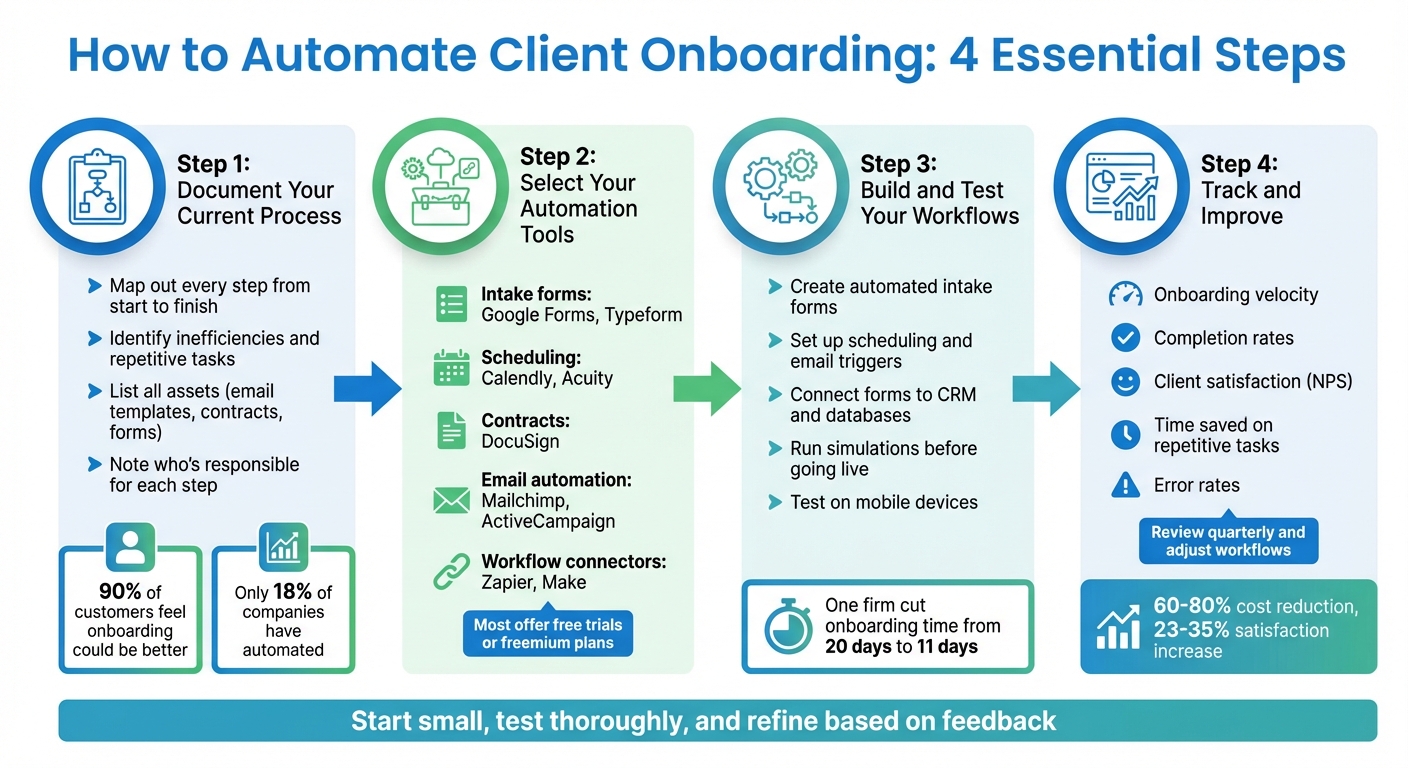
4-Step Client Onboarding Automation Process
Automate Client Onboarding in 5 Steps (Works with Any CRM or PM Tool)
sbb-itb-f54b9a0
Step 1: Document Your Current Onboarding Process
Before diving into automation, it’s crucial to map out your existing onboarding process from start to finish. Identify the exact starting point – whether it’s receiving a signed contract or an initial inquiry – and define the endpoint, like when a project status changes to "Active". This step helps you uncover inefficiencies that automation can address.
Here’s the reality: 90% of customers feel onboarding could be better, and 80% of B2B companies report delays. Yet, only 18% have taken the leap to automate. Skipping the documentation phase often leads to automating the wrong tasks or missing critical steps.
Start by taking stock of your current assets – things like email templates, contracts, intake forms, questionnaires, invoices, and spreadsheets. Make a note of who’s responsible for each step and where handoffs occur, as these transitions are often where delays creep in. Tools like Lucidchart, Miro, or Google Draw can help you create a visual map of the entire process.
List Every Step
Detail every client interaction, from the welcome email to intake forms, scheduling calls, document collection, contract signing, payment setup, and granting access to tools or platforms. Don’t just outline what should happen – document what actually happens, including any informal workarounds your team uses.
For each step, note how long it takes and who’s responsible. Ask yourself questions like, “Where do clients typically get stuck?” and “Which steps are prone to human error or compliance issues?” These answers will highlight areas where automation can make the biggest impact. If you’re in a regulated field like finance or legal, pay special attention to high-risk steps, such as verifying compliance documents or managing sensitive data.
Find Repetitive Tasks
With every interaction cataloged, shift your focus to tasks that repeat across clients. Look for areas like data entry, follow-up emails, and reminders – they’re prime candidates for automation because they eat up time without requiring specialized skills.
Take this example: In August 2025, a $1 billion RIA firm managing around 1,000 Calendly bookings annually automated their meeting sync with Wealthbox CRM using Zapier. The result? They saved 167 hours per year. Another firm with five advisors automated their intake forms to trigger preset task lists, slashing their "signed-to-funded" timeline from 20 days to just 11.
Pinpoint tasks where you’re duplicating entries, sending nearly identical emails, or manually verifying completions. These are perfect candidates for automation. That said, keep high-touch tasks – like addressing a client’s unique challenges or building personal connections – manual and personalized.
Step 2: Select Your Automation Tools
After mapping out your onboarding process, the next step is picking the right tools to bring it all together. Use your process map to pinpoint areas that need improvement and focus on tools that are affordable and easy to use – perfect for small businesses. You don’t need a fancy, enterprise-level tech stack to make a big impact.
Start by aligning tools with specific tasks. For example:
- Intake forms: Tools like Google Forms and Typeform are simple to set up and offer free or budget-friendly plans.
- Scheduling: Calendly and Acuity Scheduling can save you from endless back-and-forth emails.
- Contracts and e-signatures: DocuSign is a reliable option.
- Email automation: Mailchimp or ActiveCampaign can handle welcome emails and follow-ups with ease.
- Regulated industries: If your business needs to meet compliance standards (like in finance), tools such as PreciseFP or Clustdoc provide secure document storage and audit trails.
The real magic happens when you connect these tools. That’s where platforms like Zapier and Make (formerly Integromat) come into play. These no-code workflow tools act as bridges, allowing your apps to share data automatically. For instance, when a client books a meeting in Calendly, Zapier can create a new contact in your CRM, send a welcome email, and add the client to your onboarding checklist – all without you lifting a finger.
Tools for Each Task
Here’s a quick breakdown of popular tools, their ease of use, pricing, and integration capabilities:
| Tool | Primary Task | Setup Difficulty | Cost (USD) | Integration Options |
|---|---|---|---|---|
| Typeform / Google Forms | Intake Forms | Easy | Free to $25+/month | Zapier, Slack, Google Sheets |
| Calendly / Acuity | Scheduling | Easy | Free to $12+/month | Zoom, Salesforce, Zapier |
| DocuSign | Contracts | Medium | $10 to $40+/month | Box, Google Drive, Zapier |
| Mailchimp / ActiveCampaign | Email Sequences | Medium | Free to $13+/month | Shopify, Zapier, Canva |
| Zapier / Make | Workflow Automation | Medium to Advanced | Free to $19.99+/month | 8,000+ apps |
| Cognito Forms | Multi-form Workflows | Advanced | Free to $35+/month | Stripe, PayPal, Zapier |
Most of these tools offer free trials or freemium plans, so you can test them out before committing. Look for pricing that grows with your business. For instance, Calendly’s free plan is great for solo users, but if you’re managing a team, upgrading to a paid plan might be worth it for features like CRM integrations.
No-Code Workflow Platforms
No-code platforms like Zapier and Make simplify automation by letting you connect apps without writing a single line of code. Zapier uses straightforward "if-then" logic: for example, if a client fills out your intake form, then it triggers actions like sending a welcome email or creating a task for your team.
"Zapier lets us spin up and test automations in hours, not full engineering sprints." – Korey Marciniak, Senior Manager of Customer Support Strategy and Operations
Make (formerly Integromat) is another excellent choice, particularly for workflows that involve multiple decision points. Start small – like linking your scheduling app to your CRM – and gradually build more complex automations as you get comfortable. These platforms let you scale your processes without needing a developer, saving both time and resources.
Step 3: Build and Test Your Workflows
Start by creating streamlined intake forms, which serve as the foundation of your workflows. These forms are the first step in onboarding, so focus on gathering only the most essential information. Think about what details are absolutely necessary to deliver your service versus what would simply be "nice to have." Use simple, client-friendly language – phrases like "What brings you in today?" are far more approachable than technical jargon. Keep the forms short and easy to complete, aiming for just a few minutes to avoid losing potential clients. Don’t forget to include mandatory checkboxes for things like cancellation policies or terms of service. This ensures clients acknowledge them before proceeding. Finally, test your forms on mobile devices to make sure they work smoothly, as poor mobile performance can drastically reduce completion rates.
Create Automated Intake Forms
Optimized intake forms are the gateway to a fully automated onboarding process. Set up triggers to kick off follow-up actions as soon as a form is submitted. For example, tools like Cognito Forms or Acuity offer features like "Auto-Create Entries", which can automatically generate service agreements, payment forms, or additional questionnaires from a single submission. To streamline data handling, connect these forms to a central database using "Person Fields." This way, key details like names, emails, and company information automatically populate across all related documents, reducing errors and saving time.
Automate Scheduling and Emails
Once your intake forms are automated, take it a step further by integrating scheduling and email processes. When a client completes a form, set up automated actions such as sending booking confirmations, welcome packets, or assigning tasks. Sync your CRM with email marketing platforms like Mailchimp or ActiveCampaign to send personalized welcome sequences tailored to client segments.
Here’s a real-world example: In August 2025, a boutique wealth-management firm managing $750 million in assets used Zapier to sync updates from Redtail CRM with ActiveCampaign. This allowed them to send automated, targeted email sequences, boosting email open rates for specific segments by more than 20%. Similarly, a five-advisor regional firm cut its "signed-to-funded" time from 20 days to just 11 by automating task workflows. They used Zapier to trigger a preset task list in Wealthbox CRM as soon as a client completed a PreciseFP onboarding form.
Test and Improve Workflows
Before rolling out your workflows to actual clients, run simulations to identify any issues, such as broken links, unclear steps, or poorly timed triggers. Use simulation tools to preview the client experience and ensure everything functions as intended. For instance, double-check that welcome emails are sent only after a contract is signed – not before.
Once your workflows are live, keep an eye on important metrics like form completion rates, email open rates, and the time it takes to move from signup to first service delivery. To continuously refine your process, set up automated satisfaction surveys at the end of onboarding. These surveys can help pinpoint bottlenecks and uncover areas for improvement. Up next, you’ll learn how to track these adjustments using key performance metrics.
Step 4: Track and Improve Your Onboarding Process
Monitor Key Metrics
Once your automated workflows are up and running, it’s time to keep an eye on the numbers that matter. Start by measuring onboarding velocity – this is calculated by dividing the total number of onboarding days by the number of completed onboardings. Keep an eye on completion rates too. If a large percentage of clients drop off at a specific stage, that’s a red flag for a potential bottleneck.
Client satisfaction is just as critical as efficiency. Use tools like Net Promoter Scores (NPS) or quick post-onboarding surveys to get a pulse on how clients feel about the process. Also, pay attention to churn and retention rates during the first 90 days – strong onboarding can significantly reduce early client loss.
Don’t forget to measure the time your team saves on repetitive tasks like scheduling or data entry. Compare manual error rates before and after implementing automation to see how accuracy has improved. These metrics will help you identify weak spots and guide your next steps for refining the process.
"ROI is measured by comparing the number of tasks completed before and after automated tools are implemented. Keep a firm eye on these numbers to determine success and look for further improvements." – Charles Crouchman, Chief Product Officer, Redwood Software
Update as Your Business Changes
Once you’ve established your baseline metrics, make it a habit to adjust your onboarding process as your business grows. Quarterly reviews are a great way to ensure your workflows stay aligned with your evolving operations. For instance, in 2025, Loom revamped its onboarding process by introducing automated templates and dynamic variables. Under Brittany Soinski’s leadership, the team saved two hours of work per customer launch and boosted seat allocation rates by 20%.
As your client base expands, consider segmenting workflows to better address different client needs. Turn successful projects into reusable templates to streamline future onboarding. Automated post-onboarding surveys, using tools like Typeform or Google Forms, can create a feedback loop to catch issues early.
Finally, evaluate whether your current tools can handle increased demand without compromising service quality. While automation is a powerful tool, keep room for personal interactions – those strategic conversations can go a long way in building lasting client relationships.
Conclusion
Automating your client onboarding process isn’t just about saving time – it’s about focusing on what truly matters. By documenting your workflow, choosing the right tools, building automated systems, and tracking performance, you can scale your business effectively. In fact, automation can reduce onboarding costs by 60–80% while increasing customer satisfaction by 23–35%.
Businesses that nail this process don’t just streamline operations – they create a polished first impression that sets the stage for strong, long-term client relationships.
"By automating the most time-consuming parts of client onboarding, you can ensure this crucial stage in your new relationship runs smoothly and efficiently." – Will Morris, Staff Writer, WordCandy.co
Automation isn’t a one-and-done solution – it’s an evolving process. As your client base grows and your services change, your workflows should adapt as well. Start with small steps, test thoroughly, and refine based on feedback. The aim isn’t to replace human interaction but to make every conversation more meaningful and impactful. By continuously improving, you ensure your onboarding process stays aligned with your business’s growth and goals.
For more strategies on streamlining your operations and maximizing your impact, visit Scale Your Expertise. Explore frameworks and insights tailored for experts, coaches, and consultants who want to work smarter and with greater intention.
FAQs
What are the benefits of automating the client onboarding process?
Automating client onboarding brings a host of advantages for businesses and their clients alike. By shifting from manual processes to automated workflows, companies can save valuable time, cut down on expenses, and boost accuracy. This approach reduces mistakes, accelerates the onboarding timeline, and delivers a smoother, more tailored experience – all of which contribute to increased client satisfaction and long-term loyalty.
Beyond operational improvements, automation strengthens compliance by simplifying tasks like identity verification and regulatory checks. It also enhances transparency through centralized data management, making audits less complicated and lowering potential risks. With staff freed up to focus on more strategic tasks, businesses can scale more efficiently while ensuring every client receives a consistent and polished experience.
What’s the best way to choose tools for automating client onboarding?
To choose the best tools for automating your client onboarding, start by outlining the main steps in your process. These typically include tasks like gathering client details, scheduling meetings, sending agreements, and providing welcome materials. Once you’ve mapped out these steps, pair each task with the right type of tool – such as form builders for collecting information, scheduling apps for managing calendars, or checklist tools to monitor progress.
Be sure the tools you select work seamlessly with your current systems, like your CRM, email platform, or communication tools, and that they can handle growth as your business expands. Take advantage of free trials or pilot programs to test whether these tools improve your workflow, safeguard data, and elevate the client experience. Lastly, document the entire process and train your team to ensure a smooth rollout.
How can I make my automated client onboarding workflows more effective?
To make your automated onboarding workflows effective, start by laying out the entire client onboarding process step by step. Pinpoint tasks you can repeat, like gathering client details, arranging meetings, or sending out welcome emails. This roadmap will serve as the foundation for building your workflow.
Leverage pre-built templates to save time, tweaking them to match your specific requirements. Automate crucial steps, such as generating forms, auto-filling client data, and setting up triggers for actions like sending notifications or scheduling calls. Before you roll it out, test the workflow with a mock client to ensure everything works seamlessly and address any hiccups.
Once the workflow is live, keep an eye on metrics like how long tasks take to complete and any errors that pop up. Use this data to fine-tune the process over time. Also, make sure your team is well-trained on the system to deliver a smooth and professional onboarding experience for every client.
Related Blog Posts
- Ultimate Guide to Scaling Professional Services
- Top 10 Tools for Scaling Expert Businesses
- AI Workflow Automation: Key Strategies for Experts
- How AI Helps Solve Client Journey Pain Points
 Scale Your Expertise