

Tracking time effectively is critical for consultants. Without proper tools, you risk losing billable hours, revenue, and client trust. Here’s why time tracking software matters:
- Lost revenue: Inefficient tracking can cost $435/day or over $112,000/year for consultants charging $150/hour.
- Transparency: Detailed logs and itemized billing enhance client trust and reduce disputes.
- Profit boost: Advanced tools can improve profitability by 34% within a year.
Key features to look for include customizable billing rates, automated invoicing, and integrations with tools like QuickBooks, Asana, or Salesforce. Solo consultants and small teams can benefit from solutions like Toggl Track, Harvest, or Hubstaff, depending on their needs. By choosing the right software, you can improve efficiency, strengthen client relationships, and maximize revenue.
The 9 Best Professional Services Time Tracking Software
sbb-itb-f54b9a0
Features to Consider in Time Tracking Software
Good time tracking software doesn’t just log hours – it handles different billing rates, automates invoicing, and syncs seamlessly with other tools.
Customizable Billing Rates
Consultants often juggle multiple billing rates. For instance, you might charge $200 per hour for strategic planning, $150 for implementation, and $250 for urgent support. The right software should accommodate these variations, whether by project, client, team member, or task. This flexibility ensures accurate billing, whether you’re offering discounted rates to loyal clients or charging a premium for specialized services. Without this feature, you’re left with manual adjustments and a higher chance of billing mistakes.
Invoicing and Reporting Capabilities
Automation is key when it comes to invoicing and reporting. Tools that generate detailed invoices and timesheets not only save time but also build trust. Plus, they provide real-time insights into metrics like billable utilization and project profitability. While many aim for an 80% utilization rate, the industry average is closer to 60–65%. For a 10-person firm, even a small improvement in utilization could add $300,000 in revenue annually. Look for software with features like budget alerts to keep projects on track and avoid costly overruns.
Integration with Other Tools
Time tracking data shouldn’t live in a silo. When it integrates with systems like accounting (QuickBooks, Xero), project management (Asana, Jira), or CRM tools (Salesforce, HubSpot), you eliminate manual data entry and reduce errors. For example, one PR agency cut its tracking time by 50%, and another saved 15–20 minutes per day by syncing time tracking with their workflow. Integration with calendars (Google, Outlook) and tools like Slack also helps capture smaller tasks, ensuring no billable time slips through the cracks.
Next, we’ll guide you through setting up your time tracking software to make the most of these features.
How to Set Up Time Tracking Software
Getting your time tracking software set up correctly ensures you capture every billable minute and makes the tool easy for your team to use.
Organizing Projects and Clients
Start with a clear structure: Workspace > Client > Project > Task. This hierarchy allows for detailed reporting, which is crucial for accurate invoicing. For instance, under "Acme Corp" (client), you might have "Digital Transformation" (project), broken down further into "Strategy Phase" and "Implementation Phase" (tasks). Set billable rates at each level – whether using workspace-wide defaults, project-specific rates, or role-based rates.
Make sure the system differentiates between billable and non-billable activities, such as internal meetings or business development. Tracking both types is key to understanding true utilization rates. Additionally, link time entries to project budgets to get alerts when nearing financial or hourly limits. Once your project and client setup is in place, the next step is ensuring your team consistently uses the tool.
Getting Your Team to Use the Tool
In 2025, Talk Shop Media, a 50-person PR and marketing agency, faced a challenge: 15% of their staff regularly missed timesheet deadlines. Operations Manager Hannah McClenaghan addressed this by switching to a more user-friendly system and enforcing a "submit by 5:00 PM daily" rule. The result? They saved 60–80 hours monthly, cutting administrative time by 50%. The takeaway: time tracking should be immediate, not a task pushed to the end of the week.
Consider this: forgetting just 18 minutes of billable time daily at $150/hour adds up to $10,800 in lost revenue annually. Automating reminders via Slack or email can help ensure end-of-day compliance. Require concise descriptions for each time entry – this not only provides context for clients but also protects you during billing disputes. Frame the tool as a way to empower employees by showing them their billable utilization targets within the app, rather than as a means of surveillance.
To maintain team engagement, it’s also important to steer clear of common setup missteps.
Common Setup Mistakes to Avoid
One major mistake? Waiting until the end of the week to log hours. This often leads to inaccuracies. Stephen Wierenga, owner of Perception Engineering, addressed this issue by moving his team from Excel spreadsheets to real-time tracking in 2025. This change saved each employee 15–20 minutes per day and reclaimed over 10 hours of administrative time weekly.
Another common pitfall is creating data silos. If your time tracking software doesn’t integrate with your project management and invoicing tools, you’ll waste time manually transferring data. Ignoring non-billable work is another issue – it skews capacity planning. Lastly, avoid overly complex systems. If it takes more than a few seconds to log time, your team is unlikely to do it consistently.
"Your time tracking data is only as valuable as the insights it provides." – Hannah McClenaghan, Operations Manager, Talk Shop Media
Time Tracking Tools Compared by Use Case
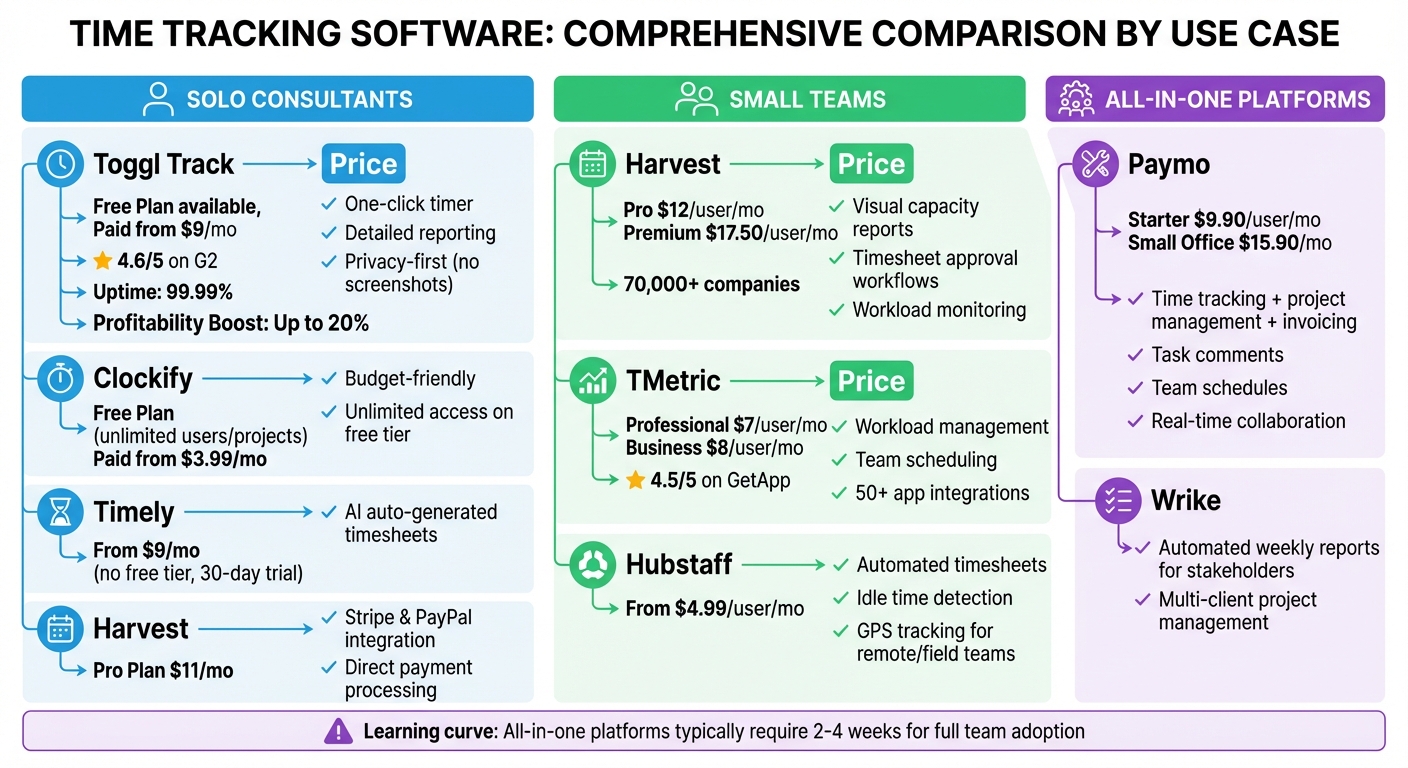
Time Tracking Software Comparison for Consultants by Use Case
Once you’ve identified the key features and setup strategies you need, comparing tools by their use case is the next step. Whether you’re a solo professional, managing a small team, or need a platform that ties everything together, the right tool can make a noticeable difference in how you work. Here’s a breakdown of some top options for 2026.
Tools for Solo Consultants
For solo consultants, reducing time spent on admin tasks is a priority. Toggl Track offers a simple one-click timer and detailed reporting, which can boost profitability by as much as 20%. It boasts 99.99% uptime, a free plan for up to five users, and paid plans starting at $9/month. With a 4.6/5 rating on G2, Toggl Track wins praise for its user-friendly design and privacy-first approach, steering clear of invasive features like screenshots or keystroke tracking.
Clockify is another solid option, especially for those on a budget. Its free plan supports unlimited users and projects, with paid plans beginning at $3.99/month. If you’re someone who often forgets to start a timer, Timely might be worth a look. It uses AI to auto-generate timesheets based on your activity. However, it doesn’t offer a free tier, with pricing starting at $9/month after a 30-day trial.
If integrated payment processing is a must, Harvest could be the answer. It connects directly with Stripe and PayPal for easy client payments. Paid plans start at $11/month for the Pro version.
Tools for Small Teams
Small teams need tools that make capacity planning and collaboration easier. Harvest excels here, offering visual capacity reports and timesheet approval workflows. These features help managers monitor workloads, ensuring no one is stretched too thin while keeping billing accurate. Mark Lewis, Founder of Netalico, shared:
"By being able to track what that billable percentage is for each of our team members, Harvest helps me make hiring decisions".
Harvest is trusted by over 70,000 companies, with pricing at $12/user/month for the Pro plan and $17.50/user/month for the Premium plan.
For teams looking for advanced management features, TMetric is a strong contender. It includes workload management, team scheduling, and over 50 app integrations, priced at $7/user/month for the Professional plan or $8/month for the Business plan. It holds a 4.5/5 rating on GetApp. Meanwhile, Hubstaff is ideal for remote teams, offering tools like automated timesheets, idle time detection, and GPS tracking for field consultants. Its plans start at $4.99/user/month. Michael O., founder of a small business consultancy, highlighted:
"We love the ability to manage project budgets directly against time spent on them so that the whole team is clear if we are running ahead or behind".
All-in-One Platforms
For those who need time tracking, project management, and invoicing in one place, all-in-one platforms are the way to go. Paymo combines these features seamlessly, with pricing starting at $9.90/user/month for the Starter plan or $15.90/month for the Small Office plan. It includes tools like task comments, team schedules, and real-time collaboration.
Wrike is another excellent choice, especially for agencies juggling multiple client projects. It provides automated weekly reports for stakeholders, making it easier to keep everyone informed. Richard Blatcher, Senior Director at Wrike, summed it up well:
"Time is money… in the world of professional services, it still rings true".
Keep in mind that all-in-one platforms often have a steeper learning curve, typically requiring 2–4 weeks for teams to fully adapt and use them consistently.
How to Choose the Right Tool for Your Business
Identifying Your Requirements
Before diving into comparisons, take a step back and figure out what your business truly needs. Are you a solo practitioner looking for a straightforward tool with one-click timers and basic invoicing? Or are you managing a team that needs features like capacity planning, timesheet approvals, and billable utilization tracking? Start here – your requirements will shape your decision.
Budget is another key factor. If you’re looking for free options, tools like Clockify allow unlimited users. For paid plans, prices range from $2.50 per user/month (Apploye) to $20 per user/month (BigTime). Think about the specific features you might need: customizable billing rates, integration with accounting software like QuickBooks or Xero, or compliance with standards like DCAA for government contractors.
Your management style also plays a role. For example, tools like Hubstaff offer features like screenshots and keystroke tracking, which may appeal to those who prefer a more hands-on approach. On the other hand, Toggl Track and Timely avoid surveillance features, focusing instead on profitability without invasive monitoring. Consider your team’s work culture and philosophy when making this choice.
Finally, take advantage of free trials – most tools offer 14 to 30 days to test the waters. This is your chance to ensure the interface is user-friendly enough for your entire team to adopt. Once you’ve clarified your needs, you can focus on aligning them with tools that fit your consulting model.
Matching Tools to Your Consultant Type
The right tool depends heavily on which consulting model you use. Solo practitioners, small teams, and growing firms all have different needs.
Solo practitioners thrive on simplicity and minimal admin tasks. Tools like Toggl Track and Clockify stand out for their easy-to-use interfaces and basic invoicing. If you often forget to start timers, Timely’s AI-powered automatic tracking can help you capture those overlooked billable minutes from quick emails or impromptu calls.
Small teams benefit from tools that encourage collaboration and provide project-level insights. Harvest, for example, offers visual capacity reports and timesheet approval workflows, making it easier to manage workloads. My Hours and Paymo are also great options, offering budget management and task coordination at affordable prices. For teams working remotely or in the field, Hubstaff’s GPS tracking and geofencing features automate clock-ins based on location boundaries.
Growing firms often need advanced features like resource forecasting and deep analytics. BigTime and Mavenlink are excellent choices, offering tools like financial analytics, capacity planning, and ERP integration. If you’re an agile or technical consultant, Tempo Timesheets integrates seamlessly with Jira, making it ideal for development-focused projects.
Here’s a compelling stat: implementing advanced time-tracking tools can boost profitability by up to 34% in just the first year. Choose a tool that aligns with your business model, test it thoroughly, and focus on features that address any revenue leaks you’re experiencing.
Conclusion
Picking the right time tracking software goes beyond simply keeping tabs on hours – it’s a key move to safeguard revenue and boost profitability. Inefficient tracking can drain consultants of thousands of dollars each year through missed billable hours and revenue loss. In fact, a well-implemented time tracking system has been shown to improve profitability by 34% within the first year.
The first step is understanding your unique needs and aligning them with the right tool. For solo consultants, simplicity and ease of use are critical to reducing admin work. Small teams benefit from tools with collaboration features and capacity planning, while growing firms need advanced analytics and resource forecasting. No matter the size of your operation, integration with your existing software is essential – disconnected systems lead to wasted time and costly errors.
When evaluating tools, focus on features that directly impact your revenue. Look for options with customizable billing rates, automated invoicing, and utilization reporting. Even small improvements in utilization rates can result in significant revenue gains for each consultant. As Joe Church Woods from Sage aptly puts it:
"Every untracked hour is lost revenue".
Make use of free trials to test different tools with your team before committing. The software should feel intuitive and easy to adopt. Once in place, use your time data to uncover inefficiencies, refine project estimates, and make smarter choices about which clients and projects to prioritize.
Time tracking isn’t about micromanaging – it’s about optimizing. It transforms consulting workflows, providing the visibility and control needed to enhance productivity and profitability.
FAQs
How does time tracking software boost profitability for consulting businesses?
Time tracking software helps consulting businesses improve profitability by ensuring precise billing, so every billable hour is accounted for. It also highlights inefficiencies that might otherwise go unnoticed, enabling you to streamline workflows and concentrate on tasks that bring the most value. Plus, tracking time offers clear insights into project timelines, making it easier to allocate resources effectively and steer clear of expensive overruns. Combined, these advantages lead to higher revenue and better control over costs.
What are the most important features to look for in time tracking software for consultants?
When selecting time tracking software for your consulting team, it’s essential to focus on features that enhance accuracy, efficiency, and workflow integration. A good tool should allow you to track billable hours by both project and role, ensuring precise invoicing and better profitability analysis. Another must-have is budget tracking, which helps you monitor project costs against estimates, keeping everything on course financially.
It’s also worth considering software that offers utilization reporting. This feature can help you pinpoint productivity trends and allocate resources more effectively. Integration capabilities are another big plus – connecting seamlessly with invoicing, project management, and accounting tools can reduce manual tasks and save time. And don’t overlook ease of use – a simple, intuitive interface encourages consistent adoption and minimizes the time spent on training or troubleshooting.
By focusing on these features, you’ll empower your team to manage their time more efficiently, stay organized, and keep your consulting practice profitable.
How can I help my team use time tracking software effectively?
To make the most out of time tracking software, focus on a few key steps to ensure your team adopts it successfully. Start by selecting a tool that’s easy to use so everyone feels comfortable navigating it. Then, provide straightforward training sessions to show your team how it works and highlight the advantages, such as better productivity and accurate billing.
Consistency is crucial. Encourage your team to log their time regularly – ideally in real-time – to minimize errors or missed entries. Take advantage of automation features like reminders and activity tracking to reduce the manual workload and make the process smoother.
Don’t forget to review time logs regularly. Offering feedback and recognizing consistent efforts can go a long way in building accountability. And lastly, set the tone by using the software yourself. When managers actively engage with the tool, it boosts trust and motivates the team to follow suit.
Related Blog Posts
- 7 Ways to Scale Your Consulting Business Fast
- Ultimate Guide to Scaling Professional Services
- Top 10 Tools for Scaling Expert Businesses
- How to Automate Client Onboarding
 Scale Your Expertise